


KCD2 Keybinder v0.1.3
A lightweight plugin that resolves conflicts between mods with custom keybindings in KCD2. Since the game only supports one keybindSuperactions.xml, this plugin automatically merges all keybinds from your installed mods into a single, conflict-free file — all done automatically on game start.
About this mod
Mods in Kingdom Come: Deliverance 2 that add custom keybindings often conflict with each other, because the game only supports one keybindSuperactions.xml.
Normally, whichever mod loads last will overwrite the others – causing you to lose keybinds.
KCD2 Keybinder fixes this by automatically scanning all your mods at game start, merging their keybind definitions, and generating a single unified keybindSuperactions.xml.
This ensures:
– All mod keybindings are preserved and available in-game
– No more overwriting or conflicts between mods
– Keybinds are neatly grouped and easy to manage in the settings
– Everything happens automatically with game launch — no manual setup required
It’s lightweight, runs in the background, and just works.
IMPORTANT:
KCD2 Keybinder provides no gameplay benefits. It is a utility only. You only need it if a mod explicitly requires it to handle keybindings. All it does is manage, merge, and organize keybinds safely.
ALSO:
It is unfortunatelly not able, to merge ALL keybindings. Every mod, that has keybinding which also edit “ elements are breaking the merged file.
So if a mod only adds a “ you are good to go.
NEW
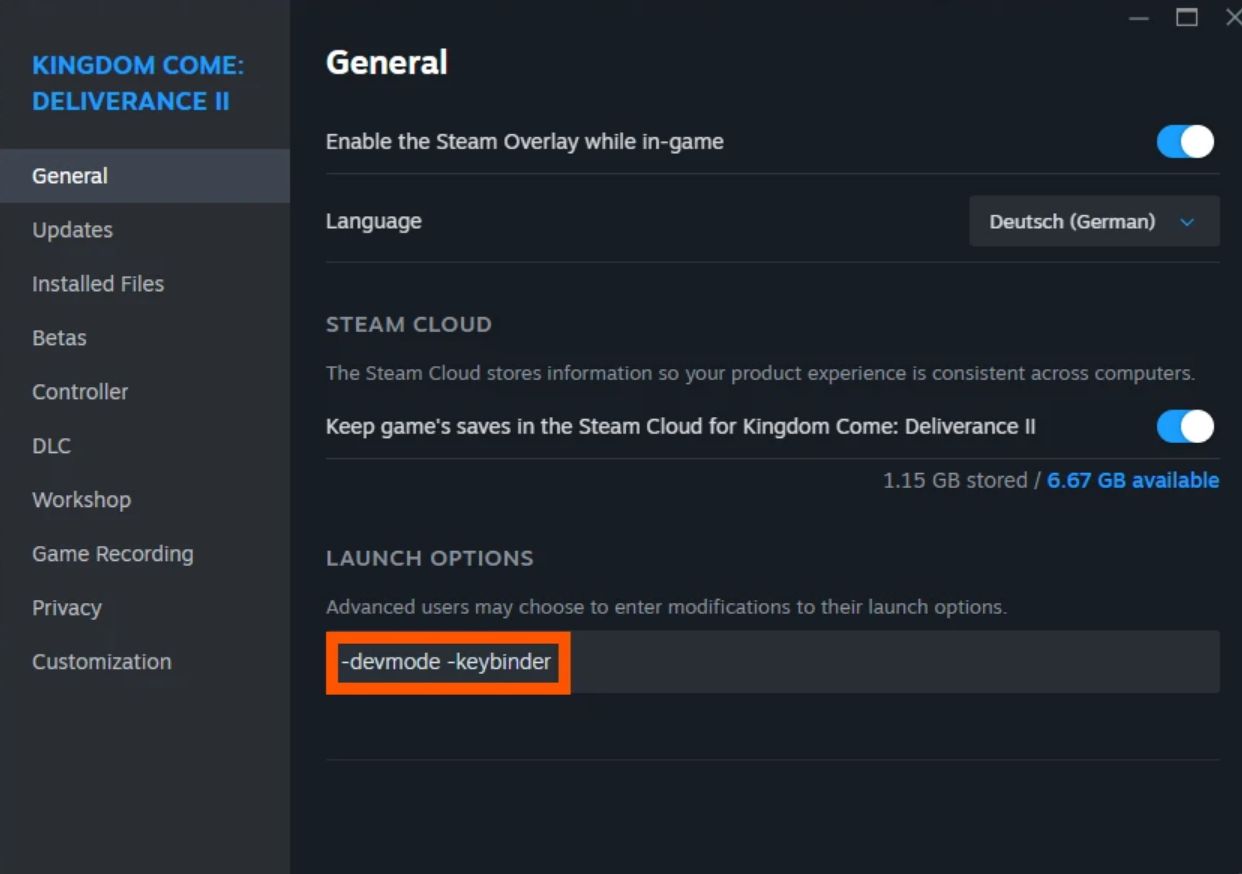
Activate or deactivate KCD2 Keybinder by adding or removing the -keybinder command in the game’s “Launch Options”. You only need to create keybinds when adding a new mod that implements them. This allows you to enable or disable the keybinder on demand without repeatedly modifying game files.
Getting Started
Unzip the contents into the directory of KingdomCome.exe (usually KingdomComeDeliverance2BinWin64MasterMasterSteamPGO). The archive contains a KCD2KeybinderPlugin.asi, a dinput8.dll (Ultimate ASI Loader), and a KCD2Keybinder.exe.
If one of them is missing, the plugin will not work.
Note: If you already have LuaDB installed, you can ignore the dinput8.dll in the zip, as this file is already present in your directory.
Open the `Properties…` of the game.
Add “-keybinder” to the launch options.
Start the game.
Enjoy clean, conflict-free controls.
The plugin (.asi) triggers KCD2Keybinder.exe, which scans all mods and generates a keybindSuperactions.xml file in a standalone mod. After that, the game initialization continues as usual.
During this process, a small console window may briefly appear. With fewer mods installed, it is barely noticeable. It closes automatically once all mods are scanned and the keybind mod is created.
Features for Players
– Automatically adds custom keybinds from mods into the game’s keybind settings.
– Keeps your existing bindings intact while merging new ones.
– Ensures proper grouping of mod-specific keybindings for clarity.
– Handles both vanilla and modded keybinds seamlessly.
– Works out-of-the-box with minimal setup—no manual XML editing required.
Notes
– KCD2 Keybinder does not change gameplay — it only manages keybindings.
– Recommended for players using multiple keybinding mods or creating custom controls.
– For modders, it provides a framework to safely add new keybindings without creating XML files manually.
Modders
If your mod contains Lua scripts that define commands needing new keybinds (like Unlimited Saving II or Camping), this plugin removes the need to manually create keybindSuperactions.xml or defaultProfile.xml.
Example usage in your script:
— @bindingCommand hw_toggle <– this line defines which command gets triggered when pressing the assigned key
— @bindingMap movement | player | … <– this line defines in which context the keybind takes effect
KCDUtils.Command.AddFunction(“hw”, “toggle”, toggleMod, “Toggles Henry’s Whistle on or off”)
The @bindingCommand tag tells the plugin which command should be added to keybindSuperactions.xml.
The @bindingMap tag specifies the context(s) where the keybind is active, such as movement, player, etc.
Mods with an existing keybindSuperactions.xml are scanned and merged into a single, consolidated list.
The resulting merged keybinds are packed into a standalone mod folder starting with zz to ensure it loads last, overriding all other keybindSuperactions.xml files.
To ensure a seamless user experience, provide localizations as a _xml.pak with a text__.xml file inside, structured like this:
ui_keybinds_group_Henrys WhistleHeinrichs Pfeifen <– actual displayed textui_keybind_Toggle Henrys WhistleHeinrichs Pfeifen umschalten <– actual displayed text